
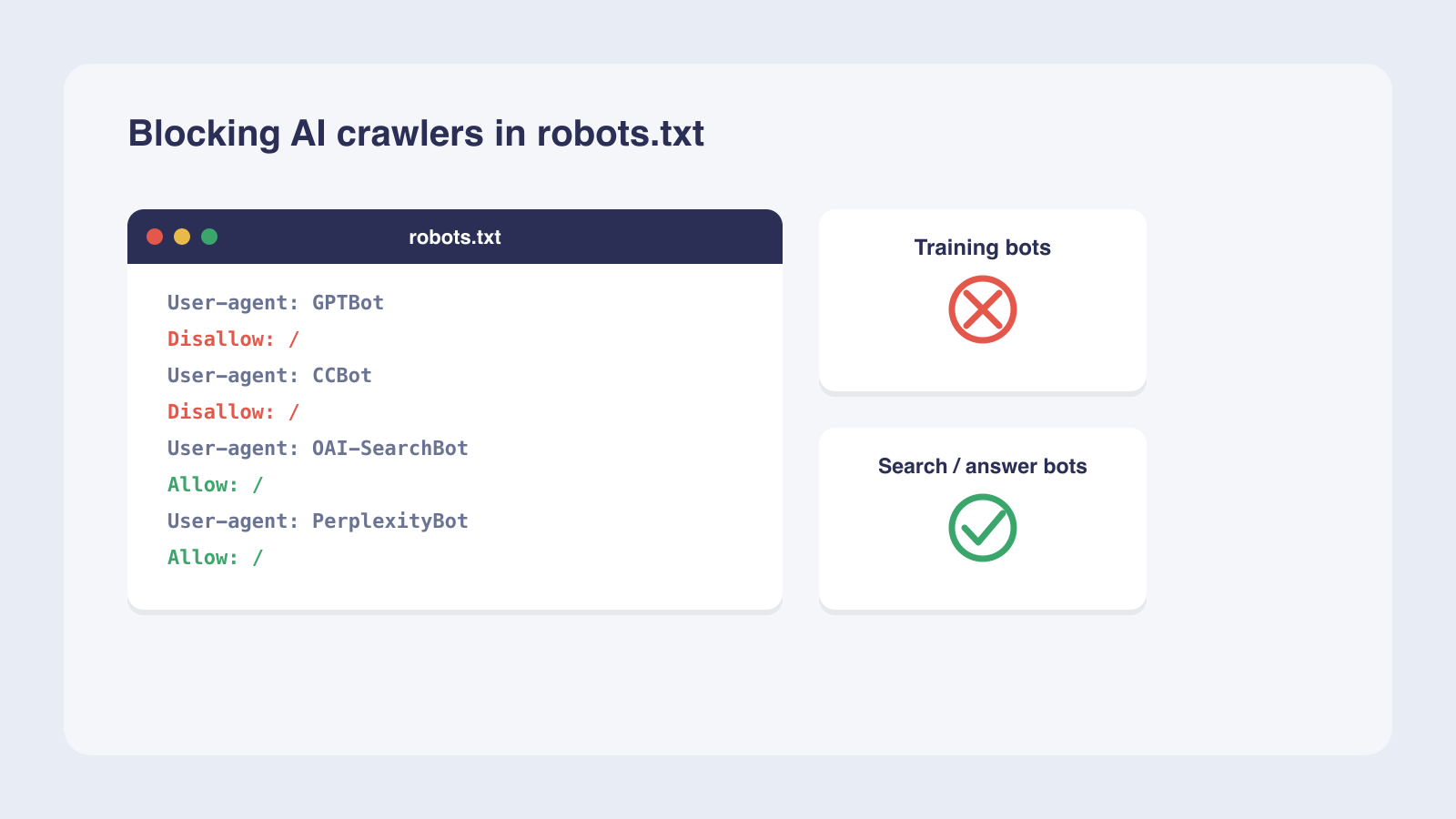
For most B2B SaaS companies, the best move is selective: block the AI training crawlers (GPTBot, ClaudeBot, CCBot) so your content is not used to train competing models, while allowing the AI search crawlers (OAI-SearchBot, PerplexityBot, Claude-SearchBot) so your brand stays visible when buyers ask AI assistants for recommendations. In robots.txt, give each bot its own named User-agent block with a Disallow or Allow, because a named bot follows only its own group and ignores the catch-all rule. Remember that robots.txt is a voluntary request, not access control: well-behaved crawlers honor it, but for paywalled or regulated content you need a WAF or CDN to enforce blocks. Blocking also only affects future crawling; it cannot remove content already in a model's training data.
For most B2B SaaS companies, the best approach is to block AI training crawlers like GPTBot, ClaudeBot, and CCBot while allowing AI search crawlers like OAI-SearchBot, PerplexityBot, and Claude-SearchBot. This protects your content from being used to train competing models while keeping your brand visible in AI-generated answers when buyers ask relevant questions. The configuration takes about 30 minutes once you have access to your robots.txt file and server logs.
What you need before configuring robots.txt for AI crawlers
Before writing any directives, confirm you have the right access, know which crawlers to target, and can audit your current traffic. Each AI operator runs multiple crawlers with different purposes, and new ones appear regularly, so a current list matters.
Access and tools you need
You need write access to your robots.txt file and a way to upload changes. Most hosting providers offer this through FTP, cPanel, or a file manager in your CMS.
- Access to your domain's robots.txt file, typically located at domain.com/robots.txt.
- A plain text editor for writing directives (no special software required).
- Ability to upload or save changes to your root directory via FTP, cPanel, or your CMS file manager.
Know which crawlers to target
AI crawlers fall into three categories: training crawlers that build foundation models, search crawlers that index for AI-powered search results, and user-triggered fetchers that retrieve pages on demand. Your robots.txt rules should treat each category differently.
- Training crawlers to block: GPTBot (OpenAI), ClaudeBot (Anthropic), CCBot (Common Crawl).
- Search crawlers to allow: OAI-SearchBot (OpenAI), PerplexityBot (Perplexity), Claude-SearchBot (Anthropic).
- User-triggered fetchers: ChatGPT-User, Claude-User, Perplexity-User.
Server log access for auditing
Before making changes, check which AI crawlers are already visiting your site. Server logs give you a baseline to verify your rules after deployment.
- Apache, NGINX, or CDN access logs showing user-agent strings and request paths.
- Filter by user-agent strings to measure request volume per bot over a 7-day window.
- Use this baseline to confirm blocked crawlers stop and allowed crawlers continue after changes.
As of May 2025, 21 major AI bots are active on the web, according to Ahrefs' analysis of approximately 140 million websites. New crawlers appear every few months, so plan to revisit your list at least twice a year.
How to configure robots.txt for AI crawlers, step by step
Configuring robots.txt for AI crawlers means writing a separate User-agent block for each bot you want to control. Each AI crawler must be named individually by its exact product token.
Step 1: List the AI crawlers to control
Start by deciding which crawlers to block and which to allow. List each crawler by its exact user-agent name. A misspelled name like GPT-Bot or Perplexity Bot will not match, and the bot will ignore your rule entirely. The comparison is not case-sensitive, but the name must be exact.
Note that Google-Extended is a robots.txt token only; traffic still comes from standard Googlebot.
Step 2: Write the directives
For each crawler, write a User-agent line followed by a Disallow or Allow directive on the next line. To block a bot, set User-agent: GPTBot followed by Disallow: /. To allow a bot, set User-agent: OAI-SearchBot followed by Allow: /.
Under RFC 9309, the Robots Exclusion Protocol standard, once a bot is named in its own group, it follows only that group and ignores the User-agent: * rules. So GPTBot sees its own Disallow: / and leaves. A search crawler you leave unnamed, like Claude-SearchBot, instead falls through to the User-agent: * group and is allowed. You can allow a search crawler either way: name it with Allow: /, or simply let the catch-all group cover it.
Apply rules per subdomain. blog.example.com and www.example.com are different hosts, each needing its own robots.txt file. Repeat this for every subdomain you want to opt out.
Step 3: Deploy and wait for compliance
Upload your robots.txt file to your root directory. According to OpenAI's crawler documentation, it can take approximately 24 hours for their systems to adjust after a robots.txt update. After that window, re-check your server logs to confirm blocked crawlers have stopped visiting and allowed crawlers continue at their previous rate.
- List each AI crawler by exact user-agent name (GPTBot, ClaudeBot, OAI-SearchBot, and so on).
- Write a User-agent block with Disallow or Allow for each bot.
- Upload the file to your root directory via FTP, cPanel, or your CMS.
- Wait about 24 hours for crawlers to detect and adjust to the new rules.
- Re-check server logs to confirm blocked crawlers stopped and allowed crawlers continue.
Mistakes to avoid when blocking AI crawlers in robots.txt
Three common errors make robots.txt rules ineffective or even harmful. Each one has a specific fix.
Naming and syntax errors
- Misspelling user-agent names: GPT-Bot, Perplexity Bot, or Claude Bot will not match their actual tokens (GPTBot, PerplexityBot, ClaudeBot). The comparison is not case-sensitive, but the name must be exact.
- Using a blanket
User-agent: *withDisallow: /blocks all crawlers including Googlebot and Bingbot, which harms your traditional SEO. Each AI crawler needs its own named block. - Retired tokens like anthropic-ai and Claude-Web are no longer used by Anthropic. Many robots.txt files still carry these old names while leaving ClaudeBot unblocked.
Overestimating enforcement
- Robots.txt is a voluntary request under RFC 9309. These rules are not a form of access authorization.
- User-triggered fetchers like Perplexity-User may not fully respect robots.txt rules, though OpenAI states its ChatGPT-User fetcher does honor it, and Anthropic states its Claude-User fetcher does too.
- For crawlers that ignore robots.txt, use WAF rules or CDN bot management to enforce blocks at the network level.
Assuming default protection
- Most sites have no AI bot rules in their robots.txt. According to Cloudflare's analysis of top domains, only about 14% of those with a robots.txt file had directives targeting AI bots, leaving the large majority on the default allow-all stance.
- Blocking does not remove content already in training datasets. If your pages were crawled before you added a Disallow rule, that content may already be part of model training.
A worked example: selective blocking for a B2B SaaS site
A mid-sized B2B SaaS company wants to prevent its documentation and blog content from training competitors' models while staying visible in AI search results. The figures below are illustrative; real request volumes vary widely by site size and traffic.
The starting situation
The company audits server logs and finds 5 AI crawlers visiting regularly, with total traffic of about 305 requests per day. Its blog and documentation pages contain proprietary insights that could help train competing AI tools, yet it also wants to remain cited in AI-powered search results, since buyers frequently ask ChatGPT and Perplexity for tool recommendations.
The robots.txt configuration
They write five User-agent blocks: three training crawlers blocked and two search crawlers allowed, plus a catch-all group that allows everything else (which is where Claude-SearchBot falls through). The file looks like this:
# Block AI training crawlers
User-agent: GPTBot
Disallow: /

User-agent: ClaudeBot
Disallow: /

User-agent: CCBot
Disallow: /

# Allow AI search crawlers
User-agent: OAI-SearchBot
Allow: /

User-agent: PerplexityBot
Allow: /

# Everything else (incl. Claude-SearchBot) falls through here
User-agent: *
Allow: /
| Crawler | Type | Directive | Before (req/day) | After 24h (req/day) |
|---|---|---|---|---|
| GPTBot | Training | Disallow: / | about 150 | 0 |
| ClaudeBot | Training | Disallow: / | about 80 | 0 |
| CCBot | Training | Disallow: / | about 40 | 0 |
| OAI-SearchBot | Search | Allow: / | about 20 | about 20 |
| PerplexityBot | Search | Allow: / | about 15 | about 15 |
The result after 24 hours
After deployment, the company waits 24 hours and re-checks logs. GPTBot, ClaudeBot, and CCBot drop to 0 requests. OAI-SearchBot continues at about 20 requests per day, and PerplexityBot at about 15. Blocked traffic drops by about 270 requests per day while the roughly 35 requests per day of allowed search traffic is preserved.
GPTBot is the most blocked AI bot on the web, disallowed by 5.89% of all websites (8,245,987 sites), according to Ahrefs. This company joins that group while keeping its AI search presence intact.
How your blocking strategy changes by business type and content sensitivity
The right robots.txt strategy depends on your business model and how sensitive your content is. A B2B SaaS company, a news publisher, and a regulated enterprise have different priorities.
B2B SaaS and AI tools
For B2B SaaS companies, the selective strategy fits most situations. Block training crawlers to protect your content from helping competitors build better models. Allow search crawlers to stay visible when buyers ask AI assistants for recommendations.
Your revenue depends on being named in AI-generated answers, so blocking search crawlers would cut off a growing channel. AI search visibility is becoming as important as traditional search ranking for B2B software.
Media and publishing
Media sites face a different trade-off. Traffic to commodity content is declining as AI surfaces serve answers directly. Some publishers block all AI crawlers to protect content value and drive subscriptions.
Others use selective blocking to preserve referral traffic from AI search while preventing training use. Optimizing for AI search is a separate consideration from blocking training crawlers. ClaudeBot saw the highest growth in block rates, increasing 32.67% year over year, according to Ahrefs.
Enterprise and compliance-sensitive sites
Enterprise sites with paywalled, regulated, or confidential content should block all AI crawlers and use WAF rules for enforcement. The robots.txt file alone is not sufficient for compliance-sensitive content. A WAF or CDN can enforce blocks at the network level, preventing access even from crawlers that ignore robots.txt. For these sites, content control outweighs AI search visibility.
| Business type | Training crawlers | Search crawlers | Extra enforcement |
|---|---|---|---|
| B2B SaaS and AI tools | Block (Disallow: /) | Allow (Allow: /) | robots.txt |
| Media and publishing | Block | Block or selective | robots.txt plus WAF |
| Enterprise and compliance | Block all | Block all | WAF plus CDN |
How long does it take and what does it cost to manage AI crawler access?
The time and cost of managing AI crawler access depend on whether you need robots.txt alone or stronger enforcement.
Time investment
Editing robots.txt takes minutes. It is a plain text file at your domain root that you can edit in any text editor and upload via FTP or your hosting control panel. The 24-hour wait for crawlers to adjust is the longest part of the process.
Ongoing maintenance means checking your rules when new AI crawlers appear, which happens a few times per year. The cost is effectively zero if you handle it yourself: the file is plain text, and the tools are free.
When to call a professional
For sites needing stronger enforcement than robots.txt, WAF rules or CDN bot management may require a developer or security professional. Budget 2 to 4 hours of technical work for setup, including configuring bot detection rules and testing against known AI crawler IP ranges.
ClaudeBot is blocked by 5.74% of all websites (8,023,055 sites), according to Ahrefs, so AI crawler management is becoming a standard practice. For ongoing monitoring of your AI visibility after configuration changes, a testing loop tracks whether your brand appears in AI-generated answers across models.
How to check your robots.txt rules are working
After deploying your rules, verify that blocked crawlers have stopped and allowed crawlers continue. Server logs are your primary tool.
Reading your server logs
- Review Apache, NGINX, or CDN access logs for AI bot user-agent strings like GPTBot, ClaudeBot, CCBot, OAI-SearchBot, PerplexityBot, and Claude-SearchBot.
- Compare request counts before and after your robots.txt change over a 24-hour window.
- Blocked crawlers should stop within about a day for frequently-rechecking bots like GPTBot; periodic crawlers such as CCBot may take longer. Allowed crawlers should continue at their previous rate.
Verifying against published IP ranges
- OpenAI publishes IP ranges for its crawlers (for example at openai.com/gptbot.json and openai.com/searchbot.json); verify that traffic from these ranges matches the user-agent strings in your logs.
- Anthropic publishes IP ranges for its crawlers at its official crawler documentation.
- Google-Extended is a robots.txt token, so traffic comes from standard Googlebot and appears under its entry in your HTTP request logs.
Monitoring at scale with Cloudflare Radar
- If your site uses Cloudflare as a CDN or WAF, use Cloudflare Radar's bot directory to monitor AI crawler activity at scale.
- Cloudflare provides bot detection IDs for major AI crawlers, including GPTBot, ChatGPT-User, and OAI-SearchBot.
- This gives you aggregate traffic data without manually parsing individual log files.
Frequently asked questions
Does blocking GPTBot remove my content from ChatGPT?
Do all AI crawlers respect robots.txt?
Can I block all AI crawlers with a single robots.txt rule?
Will blocking AI crawlers hurt my Google search rankings?
Does blocking AI crawlers remove my content from existing training data?
Next steps
Once your robots.txt rules are live and verified, the next step is measuring whether your brand still appears in AI-generated answers. Blocking training crawlers protects your content, but it should not cost you AI search visibility. VisibleAuthority's 30-Day Visibility Sprint delivers measurable before-and-after results in AI mention rates across ChatGPT, Perplexity, Gemini, and Claude through mapping, content deployment, and optimization. Request a sprint to see where your brand stands.
We'll run your category through the major models and map exactly where you appear, where competitors win, and what it takes to become the recommendation.