
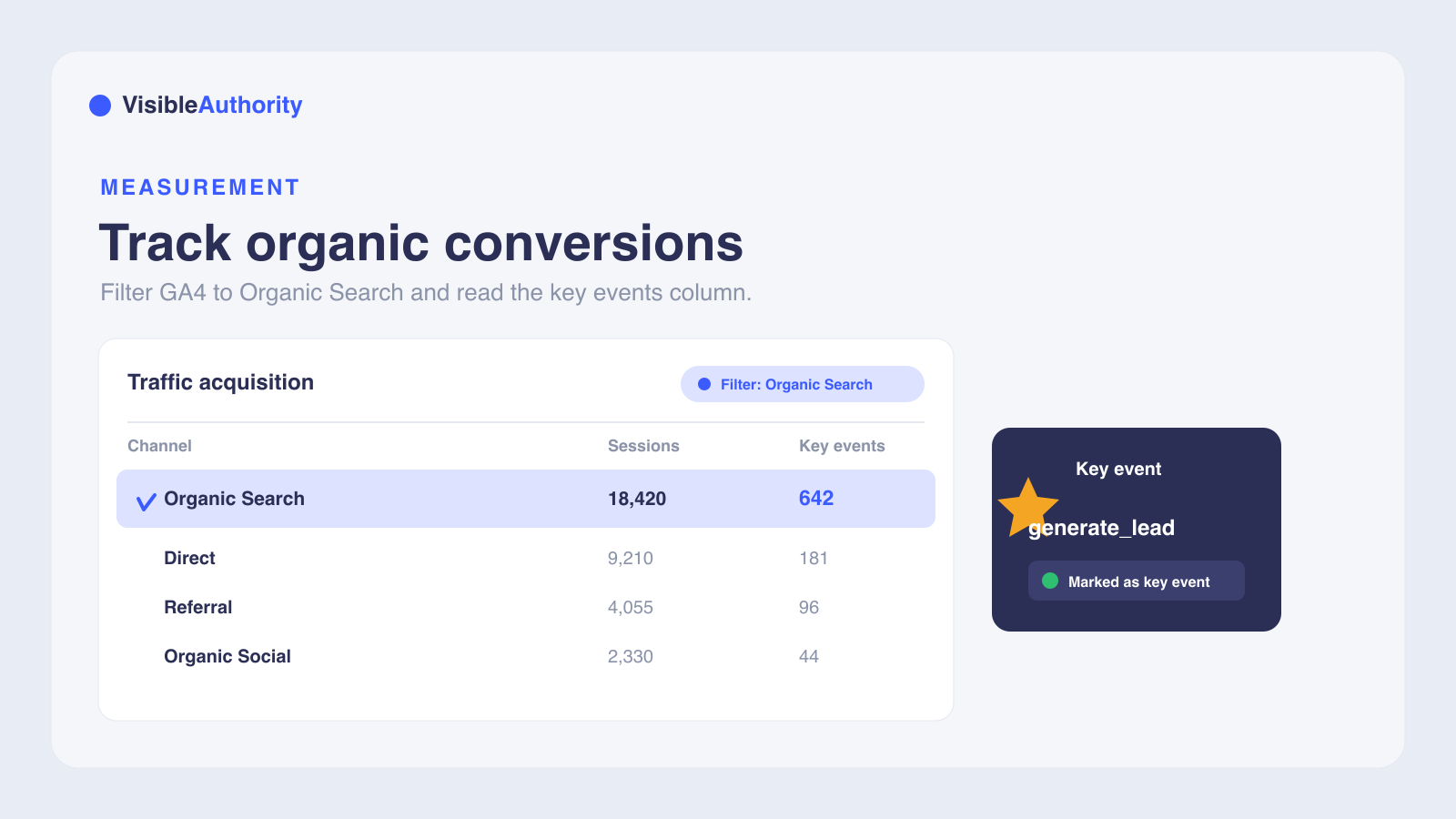
To track organic search conversions in GA4, first make sure the actions that matter, like demo requests, sign-ups, or purchases, fire as events and are marked as key events, which is what GA4 renamed conversions to in late 2024, in Admin under Data display, Events. Then open Reports, Acquisition, Traffic acquisition and filter Session default channel grouping to exactly matches Organic Search to see those key events by channel, or use the Landing page report to see them per page. Link Google Search Console to add the queries that drove the traffic, though GA4 cannot tie a specific keyword to a specific conversion. For deeper analysis, build a Free-form or Path exploration filtered to google / organic. Remember that session-scoped reports always use last-click attribution, so only event-scoped reports reflect your chosen model.
If you have ever wondered, How do I track conversions from organic search in GA4?, you already understand something many analytics setups miss: traffic counts tell you nothing without conversion data. Connecting organic sessions to outcomes like purchases, demo requests, and sign-ups is what turns SEO from a cost line into a revenue driver.
GA4 replaced Universal Analytics in July 2023, so every conversion now flows through an event-based model. For B2B SaaS companies, organic search often brings high-intent buyers who research tools before purchasing. Measuring those conversions proves which content contributes revenue.
Why organic search conversion tracking matters in GA4
Without conversion data, budget allocation and content optimization decisions are guesswork. GA4 provides the event-based tools needed to connect organic search sessions to specific outcomes like purchases, lead form submissions, and sign-ups.
Google defines Organic Search to include traffic from AI Overviews and AI Mode. AI-generated answers from ChatGPT, Perplexity, and Gemini increasingly shape how buyers discover tools before they reach your site. VisibleAuthority helps B2B SaaS brands get named inside those answers, but without GA4 conversion data you cannot measure which AI-influenced visits turn into pipeline.
Step 1: Define and mark key events
GA4 does not use session-based goals like Universal Analytics did. Every interaction is an event, and you mark the events that matter as key events. GA4 renamed conversions to key events in late 2024, so the control you click now reads Mark as key event, and the word conversion in GA4 now refers specifically to key events shared with Google Ads. Google's documentation defines a key event as an event that measures an action important to your business.
The flow is simple: an event fires, you mark it as a key event, and GA4 counts it. You need an event firing on your site first, then mark it as a key event in Admin. GA4 flags the purchase event automatically for web and app properties.
To mark an existing event, go to Admin, then Data display, then Events. Find the event under Recent events and switch on the Mark as key event toggle in its row. You can mark up to 30 events as key events for standard properties, and 50 for Analytics 360.
For more specific tracking, create a custom event in Admin, then Data display, then Events. Click Create event, name it, set conditions (such as event_name equals form_submit and page_location contains /blog/), and switch on Mark as key event. Use Google Tag Manager for complex setups, and verify with GTM Preview Mode before publishing.
Confirm events in DebugView under Admin. Do not mark page views as key events. That measures traffic, not action.
Step 2: Find organic conversion data in standard GA4 reports
Two built-in GA4 reports show organic conversion data: Traffic acquisition and Landing page. Both allow filtering to isolate organic search and view key event metrics.
Filter the Traffic acquisition report for organic search
The Traffic acquisition report lives at Reports, then Acquisition, then Traffic acquisition. Its default primary dimension is Session default channel grouping, a session-scoped definition of traffic sources that includes Direct, Organic Search, Paid Social, Organic Social, and Email.
To filter for organic search, follow these steps:
- Click Add filter above the table
- Set Dimension to Session default channel grouping
- Set Match Type to exactly matches
- Set Value to Organic Search
- Click Apply
The filtered view shows only organic search. Locate the Key events column, click All events, and select a key event like purchase or generate_lead. Add Session key event rate from the metric picker, or add Landing page plus query string as a secondary dimension to see which pages drove organic key events.
GA4 filters are case-sensitive. Typing organic instead of Organic Search returns nothing. The Semrush organic traffic guide confirms these steps.
Analyze organic conversions by landing page
Go to Reports, then Engagement, then Landing page. Apply a filter where Session medium exactly matches organic. Filtering Session default channel grouping to Organic Search works too; the two are interchangeable here. Review Sessions, Key events, and User key event rate to see how each page performs with organic traffic.
Pages with high sessions but low conversions may need CTA or content optimization. Comparing landing pages against each other helps prioritize updates and identify patterns in what converts organic visitors.
Step 3: Link Google Search Console for keyword-level insights
GA4 does not pass organic search query terms. Google Search Console fills this gap by showing which queries drove clicks and impressions on your site.
To link Search Console to GA4, go to Admin, then Product links, then Search Console Links. Click Link, choose your Search Console property, select your web data stream, and confirm. The Search Console collection is unpublished by default, so an Editor-or-above user must publish it from Reports, then Library, via the three-dot menu before the Search Console node appears in the left navigation.
After publishing, the Google organic search traffic report lives under Reports, then Search Console, then Google organic search traffic. It shows Organic Google search clicks, impressions, click-through rate, and average position alongside GA4 metrics like active users, engaged sessions, and key events. You can also track organic search conversions without this step via Reports, then Acquisition, then Traffic acquisition, filtered to Organic Search.
Search Console-linked reports limit you to three dimensions when combining Search Console metrics with GA4 dimensions: Landing page, Country, and Device category. This limit applies when you blend Search Console metrics with GA4 dimensions, so it affects the combined Search Console reports rather than every GA4 report. For broader conversion analysis with dimensions like Session source/medium, channel grouping, or event name, use the Traffic acquisition report or Explorations instead.
GA4 does not attribute conversions to specific keywords. You can see which queries drove traffic to landing pages, but not which query led to a conversion event. According to Google's documentation, Search Console data is normally available in 2 to 3 days. Some queries are hidden by privacy thresholds because Google omits anonymized queries not issued by more than a few dozen users over a two-to-three month period.
Understanding which queries drive traffic to high-converting pages helps prioritize content. The same logic extends to AI models: comparing SEO and GEO shows buyer queries now happen in ChatGPT and Perplexity as well as Google. GA4 measures what happens after visitors arrive. AI Visibility Mapping measures whether your brand gets recommended before they search, by running buyer queries across AI models to find where your brand is missing from AI-generated answers.
Step 4: Build custom reports with GA4 Explorations and interpret results
GA4 Explorations go beyond standard reports. Access them through the Explore tab in the left navigation.
For a Free-form exploration, add Session source / medium as a dimension, filter for google / organic, and add key events as metrics. Include Landing page and Device category to see how organic users behave before converting.
Path exploration visualizes how organic users move through your site before converting. Set a starting point of Session medium equals organic, then add key events as steps. Looker Studio connects to GA4 for more flexible, shareable dashboards.
Compare organic search conversion rates against other channels to assess relative traffic quality. GA4 defaults to data-driven attribution, which uses machine learning to distribute conversion credit across touchpoints based on time to conversion, device type, and order of exposure. One caveat: session-scoped and user-scoped dimension reports always use paid and organic last-click attribution regardless of the model you select. Only event-scoped dimensions reflect the attribution model setting. For example, your Traffic acquisition report, which is session-scoped, will show last-click credit for organic search even if data-driven attribution is active for event-scoped reports.
If a page has high organic sessions but low conversions, optimize the CTA or content. If certain query clusters correlate with high-converting pages, double down on that content strategy.
Fix common organic conversion tracking problems
Conversions not firing: open DebugView under Admin to confirm events are logging in real time. If events do not appear, check your trigger configuration in Google Tag Manager.
Organic traffic miscategorized: verify Session medium values are set to organic. Manual UTM parameters or auto-tagging can override the expected medium and shift traffic into a different channel.
Data discrepancies between GA4 and Search Console: Google's documentation states GSC data is normally available in 2 to 3 days. Privacy thresholds hide some queries. Do not expect an exact match between the two platforms.
Duplicate event firing: a form trigger that fires on both the submit click and the thank-you page load doubles reported conversions. Use GTM Preview Mode to catch and fix it.
Missing event parameters: for purchase events, include value, currency, and transaction_id parameters. Without them, conversions may be tracked but not properly valued.
Data retention too short: GA4 defaults to two months. Go to Admin, then Property settings, then Data retention, and extend to 14 months for meaningful historical analysis.
Test conversions polluting reports: filter by IP address or campaign label to exclude test data from production reports.
If your setup still shows unexpected results after these fixes, check Realtime reports to confirm your GA4 property is receiving data.
Frequently asked questions about tracking organic conversions in GA4
How do I see conversions from organic search in GA4?
What is a conversion event versus a goal in Universal Analytics?
Why are my organic search conversions showing as zero in GA4?
How does GA4's attribution model affect organic search conversion credit?
Can I track assisted conversions from organic search in GA4?
Start measuring your organic search ROI today
The four steps above give you the full setup: marked conversion events, filtered standard reports, Search Console keyword data, and custom Explorations. Review your organic conversion data weekly for the first month after setup to catch tracking issues early and establish a baseline.
For B2B SaaS companies where AI-generated answers shape buyer decisions, measuring organic conversions is only half the picture. Measuring your brand visibility in AI search is the other half. The 30-Day Visibility Sprint delivers measurable improvements in AI mention rates through mapping, content deployment, and optimization in a structured 30-day engagement. Book a consultation to see how your brand stacks up in AI-generated answers.
We'll run your category through the major models and map exactly where you appear, where competitors win, and what it takes to become the recommendation.